

Ugreen NASync iDX6011 Pro Review for Power Users in 2026: Desktop-Class Performance in a 6-Bay AI NAS
⚡ TL;DR: Is the Ugreen iDX6011 Pro Worth $2,599?
- MSRP is $2,599 — but Kickstarter Super Early Bird pricing starts at $1,559, with a cheaper non-Pro 32 GB variant from $999.
- Real-world benchmarks hit ~950 MB/s RAID 5 read, ~6 GB/s NVMe, and up to 10 simultaneous 4K60 HDR streams over 10 GbE.
- Actual idle power draw with 6 drives installed: ~67–68 W (~$100/year) — higher than the CPU-only spec suggests, but reasonable for the workload class.
- Best for power users, homelab builders, and small businesses running Docker, VMs, and heavy media workloads — not the right first NAS for most families.
Picture a Mac mini — now imagine a large black box underneath it, full of hard drives, running a 16-core laptop chip, a local AI assistant, dual 10-gigabit Ethernet, and two Thunderbolt 4 ports, all at once. That’s essentially the Ugreen NASync iDX6011 Pro.
Ugreen moved from cable and charger accessories to serious NAS hardware faster than anyone expected. Their first NASync crowdfunding campaign in 2024 proved the formula: credible specs, aggressive Kickstarter pricing, and a software platform that’s been closing the gap on Synology DSM at a rapid pace. The iDX6011 is their biggest swing yet.
This is not your average home NAS. It targets power users and small businesses who’ve outgrown mid-range devices and want a single box that replaces a media server, a VM host, a Docker playground, and a private AI workstation. Is it worth the premium? We dug into the hardware, ran the benchmarks, and stress-tested the AI — here’s the honest breakdown.
📹 Official Ugreen NASync iDX6011 Pro Kickstarter campaign video — Private cloud powered by secure, local AI.
Which iDX6011 Model Should You Buy?
Ugreen offers three variants of the iDX6011 at different price and performance tiers. The “Pro” label refers specifically to the Core Ultra 7 CPU, 64 GB RAM, OCuLink port, and front LCD screen — the non-Pro models share the same 6-bay chassis and dual 10GbE networking, but step down on compute and drop a few extras.
| Model | iDX6011 Pro This Review | iDX6011 (64 GB) | iDX6011 (32 GB) Best Value |
|---|---|---|---|
| CPU | Core Ultra 7 255H — 16C, 5.1 GHz, 96 TOPS NPU | Core Ultra 5 125H — 14C, 4.5 GHz, 34 TOPS NPU | Core Ultra 5 125H — 14C, 4.5 GHz, 34 TOPS NPU |
| RAM | 64 GB LPDDR5X (fixed) | 64 GB LPDDR5X (fixed) | 32 GB LPDDR5X (fixed) |
| LCD Display | ✅ 3.71-inch front touchscreen | ❌ | ❌ |
| OCuLink | ✅ (GPU dock / PCIe expansion) | ❌ | ❌ |
| Super Early Bird | $1,559 | $1,199 | $999 |
| Early Bird | $1,819 | $1,399 | $1,189 |
| MSRP (retail) | $2,599 | $1,999 | $1,699 |
| Best For | Max performance + local AI workloads | Heavy NAS use without GPU expansion need | Power users on a tighter budget |
💡 Honest pick: If you don’t plan to attach a GPU dock via OCuLink and don’t need the LCD dashboard, the iDX6011 (64 GB, $1,199 Super EB) gives you the same dual 10GbE and 6-bay storage at $360 less. The 32 GB version is the entry point for pure NAS use — 32 GB handles Docker + Plex + file services comfortably, but feels tight when local AI models are loaded into RAM simultaneously.
Key Specs at a Glance (iDX6011 Pro)
| Spec | Detail |
|---|---|
| CPU | Intel Core Ultra 7 255H — 16 cores, 5.1 GHz boost, 28W TDP |
| GPU | Intel Arc 140T (integrated) — hardware 4K/8K transcoding |
| NPU | Intel AI Boost — 13 TFLOPS / 96 TOPS on-device AI |
| RAM | 64 GB LPDDR5X — non-upgradeable |
| System Disk | Dedicated 128 GB SSD — OS isolated from data pool |
| HDD Bays | 6× lockable, hot-swappable, tool-free |
| M.2 Slots | 2× NVMe — SSD cache or independent volumes |
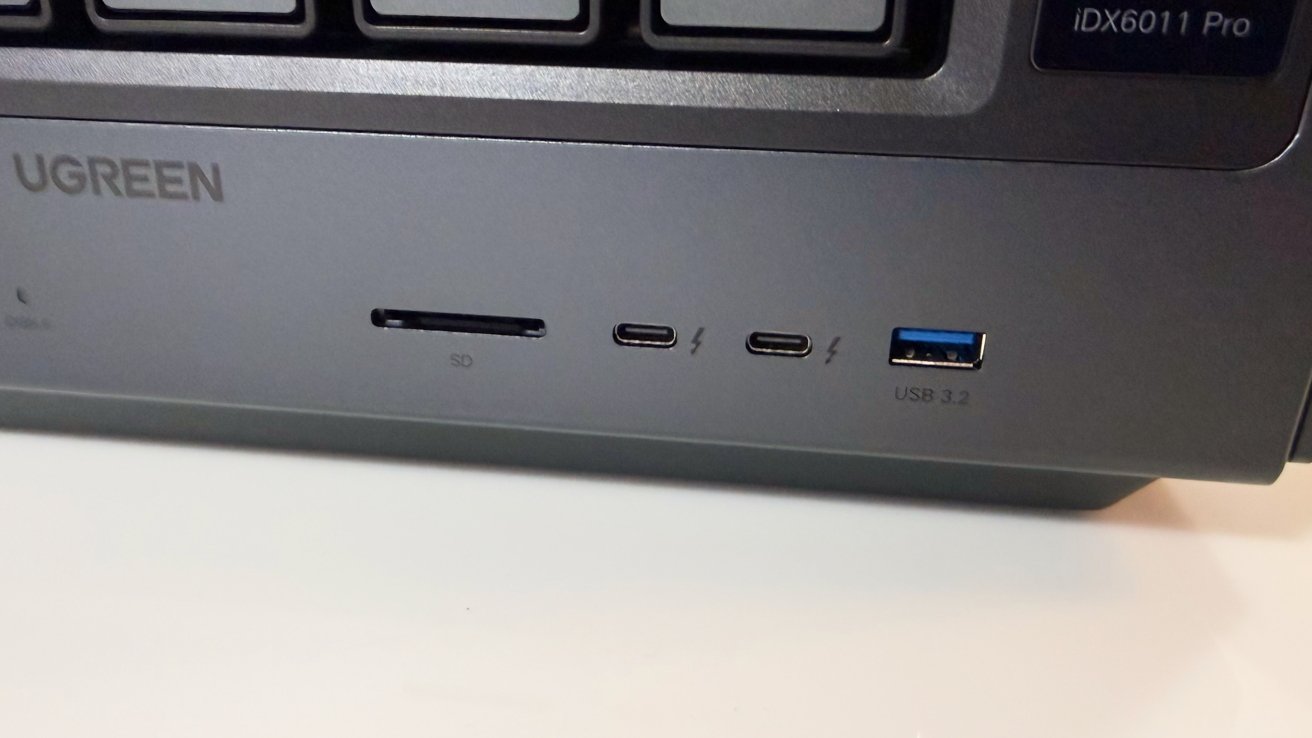
| Front Ports | 2× Thunderbolt 4, 1× USB-A 3.2 (10 Gbps), 1× SD 4.0 |
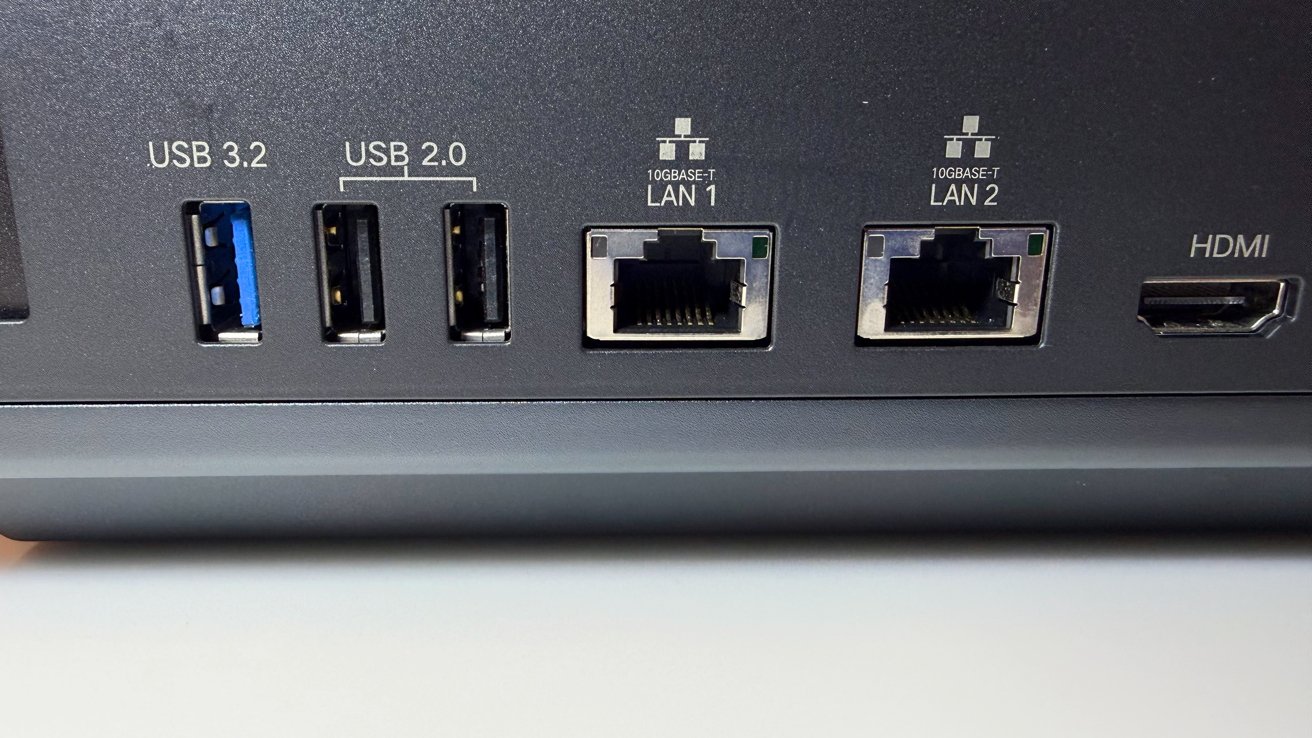
| Rear Ports | PCIe Gen4 x8, 1× USB-A 3.2, 2× USB 2.0, HDMI (8K), OCuLink, 2× 10GbE |
| Display | 3.71-inch front touchscreen — live CPU/NPU/RAM/network stats |
| Dimensions | 13.7 in W × 10.2 in H × 8.3 in D |
| Power (idle, 6 drives) | ~67–68 W (real-world tested) |
| Power (active load) | ~93–100 W+ (real-world tested) |
| OS | UGOS Pro |
| RAID | JBOD, Basic, RAID 0/1/5/6/10 (expandable online) |
| UPS Support | ✅ Yes |
Physical Design: Built Like a Workstation, Not a Consumer Box
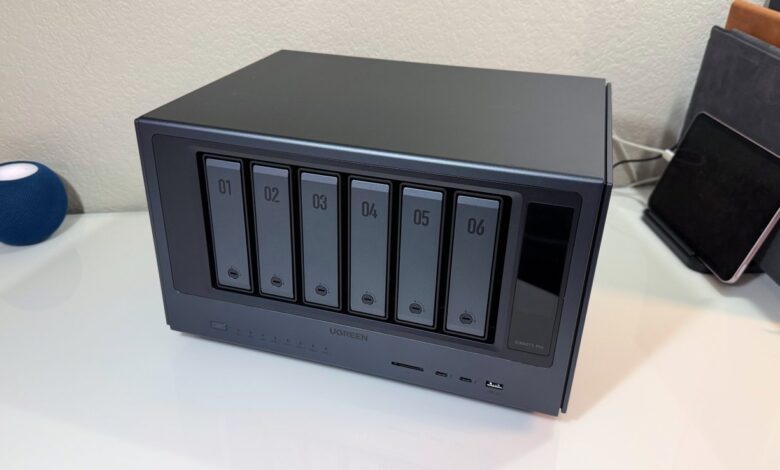
At 13.7 × 10.2 × 8.3 inches, the iDX6011 Pro is noticeably larger than most home NAS units — it’s sized for density and airflow, not for blending into a living room shelf. The full aluminum chassis feels closer to workstation-grade sheet metal than the plastic shells common on entry-level NAS devices. Side panels are removable (hex key required) to access internal expansion areas, which works but is slightly slower than tool-free designs if you plan to swap PCIe cards or M.2 drives regularly.
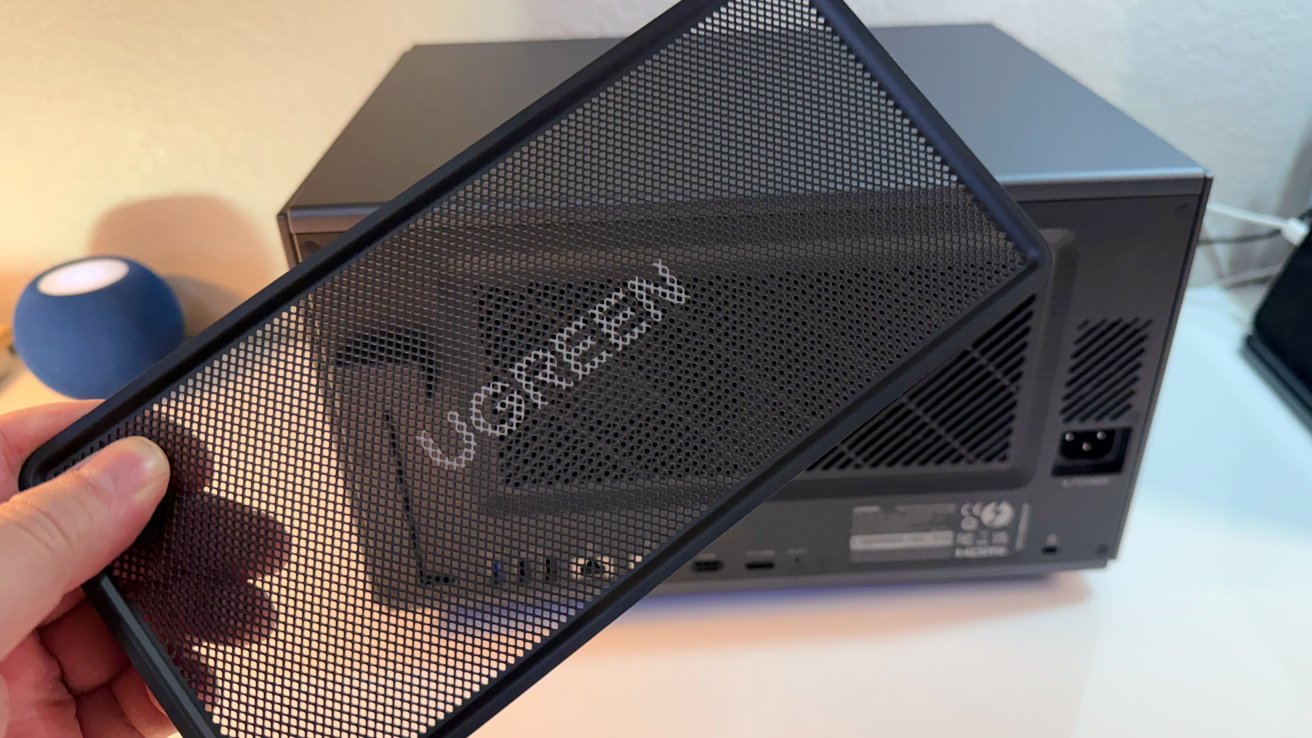
Ventilation is distributed around the sides and raised base rather than a single rear grille — smart for a chassis expected to host six large spinning drives plus a high-performance CPU. The magnetic dust filter on the rear fan grille is a practical premium touch that most NAS vendors skip entirely. Cooling uses a combination of rear chassis fans (user-adjustable in UGOS) and a dedicated CPU assembly with copper heatpipes and a dual-fan cooler managed automatically by firmware.
Two design features stand out immediately. First, the 3.71-inch front touchscreen gives live readouts of CPU, NPU, RAM, network, and storage — useful for quick health checks without opening a browser. Second, the PCIe Gen4 x8 slot opens the door to adding a GPU, fiber-channel card, or extra 25 GbE networking card, which is genuinely unusual at any consumer NAS price point.
🔤 What is PCIe? PCIe (Peripheral Component Interconnect Express) is an expansion slot — the same type that graphics cards use in gaming PCs. Having a Gen4 x8 slot means you can add capabilities to this NAS later: a 25 GbE card for faster networking, a GPU for AI inference, or even a Fibre Channel adapter for professional storage networks.
Storage: Six Bays, 196 TB Max, Three Performance Tiers
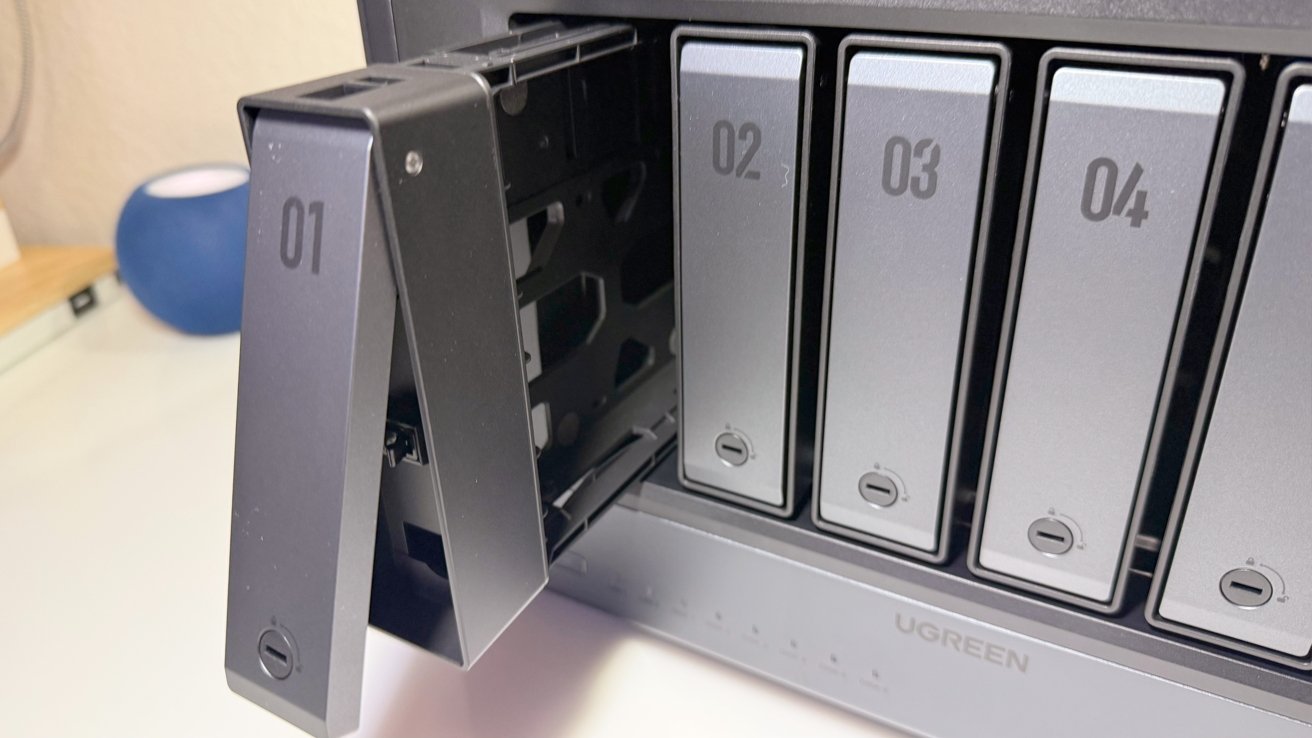
The six front bays are hot-swappable and tool-free, using a click-and-lock tray mechanism with lockable bay fronts. Ugreen has verified drives up to 30 TB, giving a maximum raw capacity of 196 TB. Note: the full metal chassis transmits drive acoustics more readily than plastic enclosures — large-platter high-capacity drives (16 TB+) will be audibly busier during seeks.
The storage architecture splits neatly into three tiers: spinning HDD bays for bulk capacity, two M.2 NVMe slots for cache or fast volumes, and a dedicated 128 GB system SSD for the OS and apps. That isolation means a RAID rebuild or volume reconfiguration won’t touch the boot environment — a clean design choice that avoids a common annoyance on cheaper NAS units.
💡 M.2 NVMe in testing: Both M.2 slots returned ~5.5–6.0 GB/s read and write consistently (tested via UGOS benchmark and SSH). This isn’t a token feature — it’s fast enough to run a low-latency VM workspace or database volume alongside your HDD array. Not sure if SSD cache is worth it for your workload? See our SSD cache NAS guide.
📐 Planning usable storage? RAID 5 on 6 drives gives you 5× the capacity of your smallest drive — but rebuilds on large arrays can take several days. Use our RAID calculator and storage planning guide to know exactly what you get before buying drives.
Ports & Connectivity: Enterprise-Grade I/O, Consumer-Priced Box
The front panel already beats most NAS rear panels: two Thunderbolt 4 ports (up to 40 Gbps each for direct Mac/PC attachment or daisy-chained storage), a USB-A 3.2 at 10 Gbps, and an SD 4.0 slot that makes camera media ingest fast without reaching behind the unit — a thoughtful placement for creative workflows.
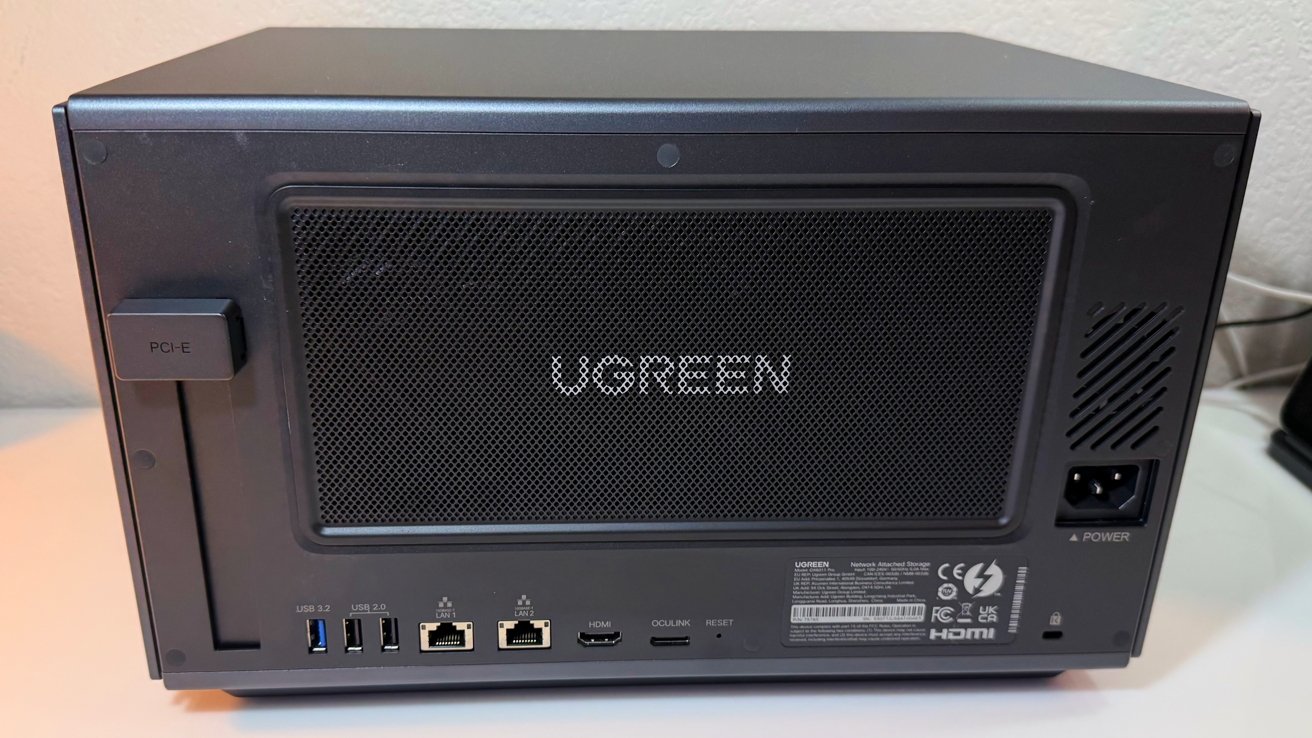
 The rear adds dual 10GBASE-T Ethernet (20 Gbps aggregate when link-aggregated), an OCuLink connector, HDMI 2.1 capable of 8K output, the PCIe Gen4 x8 slot, and additional USB ports. In testing, the OCuLink port successfully recognized an attached external GPU dock — a real-world validation that Ugreen isn’t treating this as a marketing spec, even if most users will never use it. For small studios or SMB environments with a 10 GbE switch, this NAS can fully saturate the link without any CPU bottleneck.
🔤 What is OCuLink? OCuLink is a direct PCIe cable interface — it lets you connect external PCIe devices (like a GPU in an external enclosure) directly to the NAS at full PCIe bandwidth, bypassing the slower USB or Thunderbolt overhead. It’s rare on consumer hardware and opens up options for attaching dedicated AI accelerator cards down the road.
Real-World Benchmarks: What the Numbers Actually Look Like
These aren’t manufacturer figures — they come from hands-on testing on pre-release hardware. Final shipping software may improve some numbers, but they give a reliable floor-level picture.
The RAID 5 read figure (~950 MB/s) confirms the platform can fully leverage a 10 GbE connection. The NVMe performance (~6 GB/s consistently) isn’t a footnote spec — it’s fast enough to host a VM workspace or database with real responsiveness. The weak point is dual 10GbE write speed under SMB multichannel: reads scaled to ~2,300 MB/s, but writes plateaued around ~1,300–1,500 MB/s, suggesting the second link wasn’t being fully utilized upstream. Jumbo frames were enabled (MTU 9000) during testing. This is likely a UGOS software optimization issue that should improve by final release.
Geekbench 6 scores: 2,505 single-core / 13,327 multi-core — roughly 3× a Synology DS1522+ single-core. This isn’t a minor upgrade over typical NAS CPUs; it’s a category change that makes Docker, VMs, and real-time indexing noticeably faster.
🔤 What is SMB Multichannel? SMB (Server Message Block) is the file-sharing protocol Windows uses. “Multichannel” means it can use both 10 GbE ports simultaneously for one client connection — theoretically doubling throughput to ~20 Gbps. The iDX6011 Pro read speeds confirm this works; write speeds suggest further software tuning is needed.
Power, Noise & Thermals: The Honest Numbers
The 28 W figure you’ll see in spec sheets is CPU TDP only. With six NAS-grade hard drives, two NVMe drives, and both 10 GbE links active, real-world idle power draw is ~67–68 W. Under sustained active access it climbs to ~93–100 W+, and AI-intensive tasks or external GPU use will push it higher. This is the trade-off of desktop-class hardware in a NAS chassis.
| Scenario | Power Draw (6 drives populated) | Est. Annual Cost ($0.17/kWh) |
|---|---|---|
| Idle, drives spinning (24/7) | ~67–68 W | ~$100/year |
| Active file access (24/7) | ~93–100 W | ~$138–$149/year |
| Drive spin-down + sleep | ~35–40 W est. | ~$52–$59/year |
| Fan Mode | Noise Level (dBA) | Context |
|---|---|---|
| Low / quiet (idle) | ~39–40 dBA | Comparable to a quiet office fan |
| Auto (idle) | ~40–43 dBA | Typical background hum |
| Max fans (idle) | ~48 dBA | Noticeably audible in a quiet room |
| Max fans + active 6 drives | ~50–51 dBA | Best placed in a closet or server rack |
Thermally, after 36 hours of sustained access the chassis behaved well: ~35°C on top, ~38°C around the drive bays, ~44–45°C at the rear fan area. The LCD ran around 45°C. No thermal warnings were raised in UGOS during normal testing — only during synthetic SSD stress loops that aren’t representative of real workloads.
⚡ Want to keep annual electricity costs low? Configure drive spin-down in UGOS for bays you access infrequently, and use UGOS power schedules to spin up only during business hours. Our energy-efficient NAS guide covers exactly how to set this up.
UGOS Pro Software: Feature-Complete for Most, Still Maturing at the Edges
UGOS Pro presents a broadly familiar NAS experience with a clean web interface, companion mobile apps, and all the core services you’d expect: RAID management, SMB/NFS/AFP file sharing, snapshots, iSCSI block storage, Docker containers, virtual machines, and multi-target backup (NAS-to-NAS, NAS-to-cloud, scheduled with policy filtering). For most users, the day-to-day experience is smooth and comparable to Synology DSM — Ugreen estimates ~90% feature parity.
Security is well-covered: AES-256 encryption, two-factor authentication, real-time virus monitoring, firewall with DoS protection, and native Apple Time Machine support. The gaps are specific but notable for power users:
- No ZFS — users who specifically want ZFS features (checksums, copy-on-write, datasets) won’t find them in UGOS Pro
- No native Plex — Plex Media Server isn’t available as a first-party UGOS package yet; Jellyfin works as an alternative via Docker
- No comprehensive security scanner — UGOS doesn’t yet offer an auditing tool that checks weak passwords, open ports, and exposed services in one guided view (unlike Synology Security Advisor)
🛡️ Before opening any ports to the internet: Even the best NAS needs proper hardening. Our NAS ransomware protection checklist walks you through firewall rules, VPN-only remote access, and 2FA setup in under 15 minutes — essential reading before your first public-facing service.
AI Features (Uliya): Promising Privacy Play, Still Early-Stage
Ugreen’s AI suite, branded Uliya, runs entirely on the Intel AI Boost NPU (13 TFLOPS / 96 TOPS) — no cloud, no subscription, no data leaving your home network. It launches as a ChatGPT-style interface layered over your personal data: photo search by natural language, audio transcription with mind-map summaries, document Q&A, and automatic media tagging. All AI features are disabled by default and require manual model installation — you opt in, nothing runs behind your back.
📹 NASCompares deep-dive video review of the Ugreen iDX6011 Pro — including AI feature walkthroughs and live benchmarks.
✅ What Uliya Can Do Today
- Conversational Q&A — works offline using local LLMs; optional online search can be toggled on
- Document summarization — right-click any supported file in UGOS file manager to summarize and ask follow-up questions
- Audio transcription — upload voice memos or audio files; get transcripts, summaries, topic maps, and translations locally
- Photo recognition — people and content identification integrated into the photo management app (the most mature part of the AI stack)
- Cloud AI option — connect an external API key (OpenAI, etc.) if you want to supplement local models
⚠️ What Uliya Cannot Do Yet
- No directory-level pre-crawling — you can’t simply point Uliya at a folder and have it index everything automatically; several workflows require manual file uploads into a knowledge base
- No generative image or video creation — AI is analysis-only, not creative
- Rigid permission controls — you can’t grant the assistant access to specific folders while blocking others; it’s all-or-restricted, which limits practical use in shared environments
- Limited smart commands — the assistant can trigger a small set of device actions, but command recognition is inconsistent; queries sometimes get treated as chat prompts instead of actionable instructions
- Occasional inaccuracies — typical of smaller local models; no transparency into which portion of a response comes from local data vs. general model knowledge
🔤 What is an NPU? An NPU (Neural Processing Unit) is a dedicated chip designed specifically for AI math — matrix multiplications, tensor operations, and inference tasks. Unlike using the main CPU (slow) or a discrete GPU (power-hungry), an NPU runs these tasks efficiently at low power. The Intel AI Boost NPU in the iDX6011 Pro is rated at 13 TFLOPS — enough to run smaller local language models without maxing out the CPU.
The bottom line on Uliya: the privacy architecture is the strongest argument for it — everything local, no third-party data exposure, no monthly AI subscription. The execution is 12–18 months behind the promise. If on-device AI is your primary purchase motivation, wait for the shipped software to prove it out. If it’s a bonus feature on top of an otherwise compelling NAS, it’s worth having for free.
How Does It Stack Up Against the Competition?
| Feature | Ugreen iDX6011 Pro This Review | QNAP TS-873A | Synology DS1522+ |
|---|---|---|---|
| Price (device only) | $2,599 / from $1,559 KS | ~$900–$1,000 | ~$700–$750 |
| CPU | Intel Core Ultra 7 255H (16C, 5.1 GHz) | AMD Ryzen V1500B (4C) | AMD Ryzen R1600 (2C) |
| Geekbench 6 (single-core) | ~2,505 | ~650 | ~480 |
| RAM | 64 GB fixed | 8 GB (up to 64 GB) | 8 GB (up to 32 GB) |
| HDD Bays | 6 + 2 M.2 | 8 + 2 M.2 | 5 + 2 M.2 |
| Networking | 2× 10GbE + 2× Thunderbolt 4 | 2× 2.5GbE (PCIe upgradeable) | 4× 1GbE (PCIe expansion) |
| PCIe Expansion | Gen4 x8 (full-size) | PCIe 2.0 x2 | PCIe 3.0 x4 |
| On-Device AI / NPU | ✅ 13 TFLOPS NPU (Uliya) | ❌ | ❌ |
| OCuLink | ✅ (GPU dock tested, works) | ❌ | ❌ |
| Thunderbolt 4 | ✅ 2× front | ❌ | ❌ |
| ZFS Support | ❌ | ✅ (QuTS Hero) | ❌ |
| Native Plex | ❌ (Jellyfin via Docker) | ✅ | ✅ |
| Idle Power (with drives) | ~67–68 W | ~30 W | ~18–20 W |
| Software Ecosystem | UGOS Pro (maturing) | QTS/QuTS Hero (feature-rich) | DSM (best-in-class) |
| Best For | Max compute + AI homelab + SMB | High-capacity power users | Reliability-first families |
Looking for broader NAS brand comparisons at lower price points? Our best Synology alternatives guide covers Ugreen, QNAP, TerraMaster, and Asustor across the full price spectrum.
Pricing & Where to Buy
🛒 Ugreen NASync iDX6011 Pro — Current Kickstarter Pricing
| Tier | iDX6011 Pro (64 GB) | iDX6011 (64 GB) | iDX6011 (32 GB) |
|---|---|---|---|
| Super Early Bird | $1,559 | $1,199 | $999 |
| Early Bird | $1,819 | $1,399 | $1,189 |
| MSRP (retail) | $2,599 | $1,999 | $1,699 |
⚠️ Super Early Bird requires a refundable reservation deposit of $30 to hold your price tier — verify availability on the campaign page.
HomeCloudHQ earns a small commission if you buy through our links — at no extra cost to you.
⚠️ Crowdfunding risk — read before backing: This is a Kickstarter pre-order, not a retail purchase. Even with Ugreen’s established NAS track record, Kickstarter variables remain: delivery timelines may shift, software features (especially AI) are explicitly described as still in active optimization, and final specs may differ from prototype units reviewed here. Only commit funds you’re comfortable waiting for, and treat AI feature completeness as provisional until post-launch update history confirms delivery at scale.
Don’t Forget the Drives
The iDX6011 Pro ships empty. For a 6-bay RAID 5 build you need at least 4–5 matching NAS-rated drives:
- Seagate IronWolf 8 TB — proven NAS workload reliability, ~$191 each (×6 = ~$1,145)
- WD Red Plus 4 TB — solid budget option if you don’t need massive raw capacity, ~$123 each (×6 = ~$738)
Who Should (and Shouldn’t) Buy This NAS?
✅ Buy the iDX6011 Pro if you…
- Run multiple Docker containers or VMs and keep hitting CPU/RAM ceilings on current hardware
- Need dual 10 GbE for a video production studio, small office, or multi-user creative environment
- Want a Plex/Jellyfin server that never drops frames — 10 concurrent 4K60 HDR streams is real-world proven
- Are building a homelab and want PCIe + OCuLink flexibility for GPU or networking upgrades
- Care about on-device AI privacy and want to experiment with local LLMs on your own documents and media
- Are comfortable with Kickstarter pre-order dynamics and Ugreen’s established hardware delivery track record
❌ Skip the iDX6011 Pro if you…
- Primarily want to back up family photos and get off Google Photos — a Synology DS224+ at ~$410 does this beautifully for a fraction of the cost (see our complete NAS buying guide for families)
- Are a first-time NAS buyer — the complexity and Kickstarter risk are unnecessary for your use case
- Specifically need ZFS, native Plex, or a mature security auditing tool — UGOS Pro doesn’t yet offer these
- Are on a budget under $500 — check our best NAS under $500 guide first
- Want the most polished software ecosystem — Synology DSM remains the gold standard for app quality and long-term support
Pros & Cons
✅ Pros
- Desktop-class Intel Core Ultra 7 in a NAS chassis — genuinely fast
- Dual 10 GbE + dual Thunderbolt 4 — connectivity that rivals enterprise gear
- 64 GB RAM standard — no upgrades needed for heavy workloads
- PCIe Gen4 x8 + OCuLink — real GPU dock tested and confirmed
- ~950 MB/s RAID 5 read / ~670 MB/s write with SSD cache enabled
- ~6 GB/s internal NVMe — real workstation-grade speed
- 10 simultaneous 4K60 HDR streams tested over 10 GbE
- Front 3.71-inch touchscreen — live system stats without opening a browser
- Dedicated 128 GB system SSD — OS fully isolated from data drives
- Magnetic rear dust filter — premium touch competitors skip
- Uliya AI fully local — zero cloud dependency, no subscription
- Docker + VMs robust and well-integrated in UGOS Pro
- UPS support built-in
- Shipping estimated May 2026 — one of the faster Kickstarter timelines
⚠️ Cons
- $2,599 MSRP — 3× the price of a prosumer 5-bay NAS
- Kickstarter pre-order: delivery risk remains despite Ugreen’s track record
- $30 refundable deposit required to lock Super Early Bird pricing
- RAM non-upgradeable — 64 GB is plenty today, but no future path
- ~67–68 W idle with 6 drives — not energy-efficient vs low-power NAS
- No ZFS support in UGOS Pro
- No native Plex — Jellyfin via Docker is the workaround
- No comprehensive security auditing tool (unlike Synology Security Advisor)
- Dual 10GbE SMB write speeds (~1,400 MB/s) lag behind reads (~2,300 MB/s)
- Uliya AI needs manual model install; no folder auto-crawling; inconsistent commands
- 50–51 dBA under full load — not a living room device
Watch: Full In-Depth Video Review
Before deciding, it’s worth seeing the hardware in action. This deep-dive covers the physical build, live benchmark runs, UGOS Pro walkthrough, and an honest hands-on demo of the Uliya AI features — including where they fall short.
📹 In-depth iDX6011 Pro review — hardware tour, live benchmarks, AI features demo, and honest verdict.
Want to see what the NAS looks like fresh out of the box, straight from CES 2026 where Ugreen first unveiled it?
📹 First look at the Ugreen NASync iDX6011 Pro at CES 2026 — confirming the $1,559 Kickstarter pricing and initial hardware impressions.
📹 NASCompares full review — benchmark methodology, RAID performance numbers, thermals, and AI feature walkthrough.
Our Verdict
“The iDX6011 Pro is the right kind of overkill: desktop-class performance, enterprise-grade connectivity, and genuinely private local AI in a single NAS chassis — but the premium only makes sense if your workload actually demands it.”
If you’re regularly hitting the CPU ceiling on a mid-range NAS — transcoding queues backing up, Docker containers starved for RAM, VMs crawling — the iDX6011 Pro fixes all of that decisively. The Intel Core Ultra 7 255H isn’t a marketing upgrade; it’s a 3× single-core performance jump over the competition, backed by 64 GB of RAM, dual 10 GbE networking, and a PCIe expansion slot that actually works with real GPU hardware. For power users, homelab builders, and small businesses, these aren’t niche specs — they’re exactly what’s been missing from the NAS category for years.
The caveats are real but manageable. UGOS Pro is maturing fast but still lacks ZFS, native Plex, and a security auditing wizard. The Uliya AI suite needs another 12–18 months to match the marketing ambition — it’s more “interesting beta” than “daily driver AI assistant” right now. The Kickstarter risk is lower than average given Ugreen’s proven 2024 NASync delivery track record, but it’s not zero. And at ~67–68 W idle with a full drive bay, this isn’t the NAS you leave running 24/7 in a bedroom.
The one-sentence verdict for anyone deciding right now: if your NAS needs to run Docker + VMs + 4K Plex + AI experimentation simultaneously, there is nothing else at this price that comes close. If you need two of those things or fewer, save $1,200 and look at our best NAS for home use guide.
HomeCloudHQ earns a small commission if you buy through our links — at no extra cost to you.
📅 Timing note: The Kickstarter campaign launched in March 2026, with shipping scheduled for May 2026. Super Early Bird pricing ($1,559 for the Pro, $999 for the 32 GB base model) requires a $30 refundable reservation deposit — this holds your price tier while the campaign runs. Verify current tier availability on the Kickstarter page before placing your deposit.
Frequently Asked Questions
No — it’s built for power users and small businesses. If you’re new to NAS and want to back up photos or replace Google Photos, a Synology DS224+ at ~$410 is simpler, cheaper, and better supported. See our complete NAS buying guide to find the right fit for your level.
Use NAS-certified drives rated for 24/7 workloads. Ugreen has validated drives up to 30 TB per bay. For most power users, Seagate IronWolf 8 TB drives offer the best value-to-capacity ratio. The test configuration used a mix of 4 TB Seagate Reds and 24 TB WD Red Pros without issues. Avoid SMR desktop drives — they’re not designed for NAS workloads and will cause RAID rebuild problems.
Not via a native UGOS Pro package — Plex Media Server isn’t available as a first-party app yet. The workaround is to install Plex as a Docker container, which works reliably given the 64 GB RAM and Core Ultra 7 hardware. Jellyfin is also fully supported and is a strong open-source alternative. Hardware-accelerated transcoding works in both Plex Docker and Jellyfin through the Intel Arc 140T GPU.
Measured at ~39–40 dBA at idle (quiet fan mode) and ~50–51 dBA under full load with six drives spinning. This makes it comparable to a white-noise machine at idle but noticeably audible in a quiet room when working hard. Best placement is in a dedicated home office, closet rack, or utility room — not on a living room shelf or in a bedroom.
Yes — UGOS Pro supports Apple Time Machine natively. Ugreen provides a video setup guide to walk you through the configuration, which simplifies onboarding for Mac-heavy homes and small studios.
Yes — the $30 Super Early Bird reservation deposit is explicitly refundable if you decide not to proceed with the full pledge. However, once you commit the full Kickstarter amount, standard Kickstarter terms apply. Ugreen’s 2024 NASync campaign shipped on schedule and at the promised specs — but past performance doesn’t guarantee future outcomes on crowdfunded projects.
No — the 64 GB LPDDR5X RAM is soldered and non-upgradeable on all three iDX6011 variants. The Pro ships with 64 GB, which is more than enough for current Docker, VM, and AI workloads. The base 32 GB model handles NAS + Plex + Docker comfortably but will feel tight if you load multiple local AI models into memory simultaneously.
Your data safety depends on your setup, not the campaign status. Run RAID 5 or RAID 6 for drive-failure redundancy, and follow the NAS security checklist before enabling remote access. For truly critical data, always maintain an off-site copy using a 3-2-1 backup strategy — no RAID level protects against fire, theft, or ransomware that encrypts the whole array.
The Pro adds four exclusive features over the standard 64 GB model: a faster Intel Core Ultra 7 255H (vs Core Ultra 5 125H), a 3.71-inch front LCD touchscreen, an OCuLink port for external GPU dock connection, and a higher NPU rating (96 TOPS vs 34 TOPS). Networking (2× 10GbE + 2× Thunderbolt 4), bays, and PCIe slots are identical across all three variants. If you don’t plan to use OCuLink or the LCD, the standard 64 GB at $1,199 Super EB saves you $360.
Ugreen has stated a shipping target of May 2026 for Kickstarter backers. The campaign launched in March 2026. Retail availability timeline has not been confirmed — the Kickstarter campaign is the primary purchasing channel for 2026.
📧 Get Our Free NAS Setup Checklist
First NAS? Download our free 10-step setup checklist — covers UGOS Pro configuration, RAID choice, remote access, and backup strategy. Works for Ugreen, Synology, and QNAP.
🔒 No spam. Unsubscribe in one click.