
Best Synology Alternatives 2026: Top 5 Picks Compared
- • Why users are leaving: drive restrictions, 1GbE stagnation, premium pricing.
- • Ugreen DXP4800+ – Best hardware: Intel N100, 8GB DDR5, 2.5GbE, premium build.
- • TerraMaster F4-424 Pro – Best value: 10GbE + 32GB RAM at $499.
- • TrueNAS SCALE – Maximum freedom: free, open-source ZFS, no vendor lock-in.
Best Synology Alternatives 2026: Top 5 Picks Compared
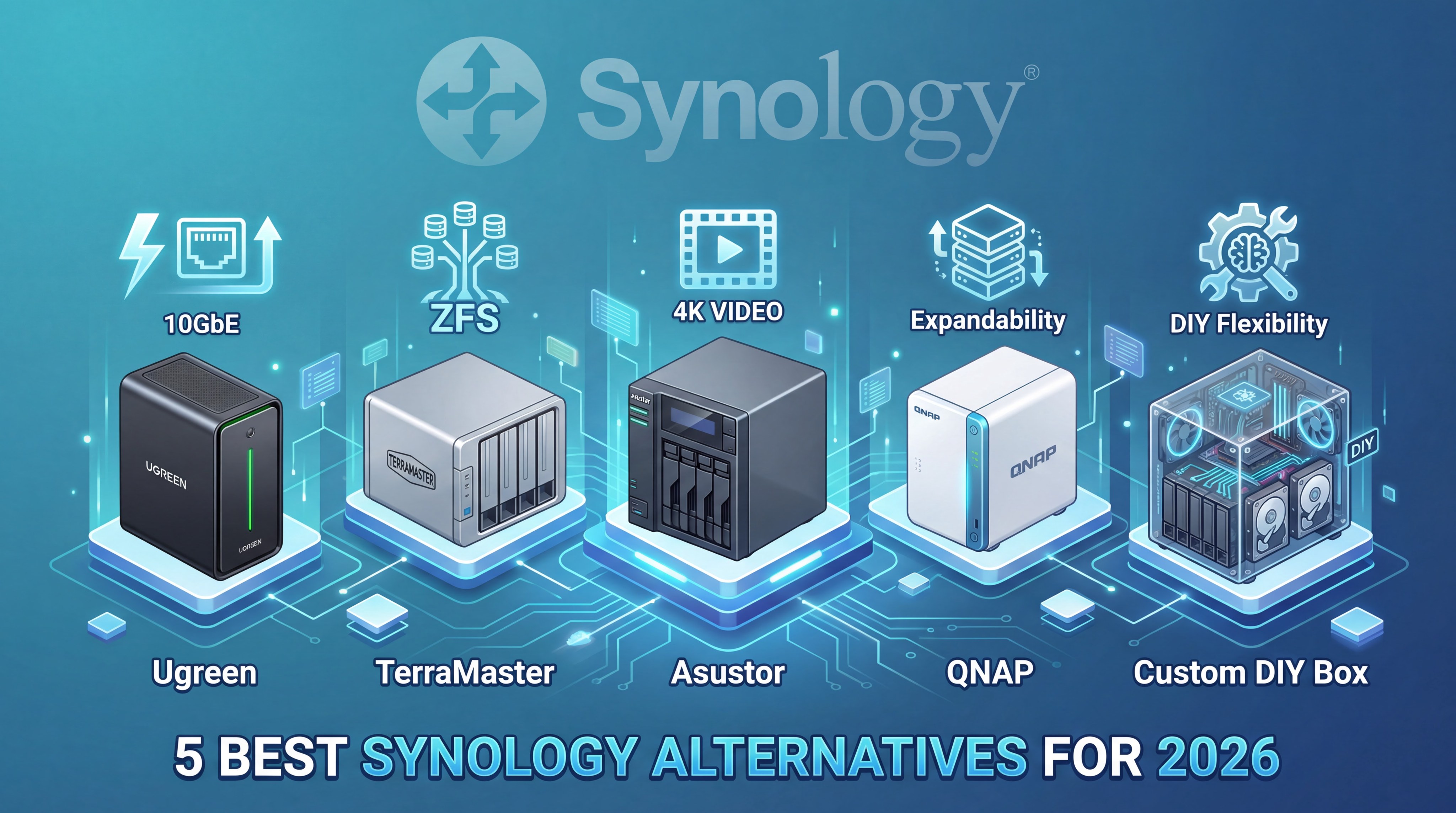
More freedom, faster hardware, and better value than Synology — without the lock-in.
⚡ TL;DR — Best Synology Alternatives 2026
- Best overall: Asustor Lockerstor 4 Gen2 — the easiest switch for most families and home users.
- Best hardware value: TerraMaster F4-425 Plus — dual 5GbE, 16GB DDR5, and 3× M.2 slots in one box.
- Best for freedom: TrueNAS SCALE — $0 software license, ZFS, and no vendor lock-in.
- Best newcomer: Ugreen DXP4800 Plus — premium design, modern Intel platform, and no drive restrictions.
- Best for power users: QNAP TS-464 — strongest VM and Docker features, but only if you take security seriously.
HomeCloudHQ earns a small commission if you buy through our links, at no extra cost to you. Prices change often, so always check current price before purchasing.
Last month, a HomeCloudHQ reader named Marcus sent me a screenshot of his Synology dashboard. A giant yellow warning banner stretched across the top: his WD Red drives — drives that had worked perfectly for years — were suddenly flagged as “incompatible.” Nothing had changed on his end. Synology had quietly changed the rules. Sound familiar?
That moment is why so many people are researching Synology alternatives 2026 right now. The hardware hasn’t kept pace with the market, drive restrictions are getting tighter, and competitors now offer faster networking, more RAM, and fewer limitations for the same money — or less. If you’re wondering whether it’s finally time to leave the Synology ecosystem, this guide gives you the honest answer.
This article compares the five best Synology alternatives 2026 for different kinds of users — families, Plex users, power users, and people who never want to deal with vendor lock-in again. Some beat Synology on hardware. Some beat it on value. One beats it on long-term freedom. The right choice depends on which pain point matters most to you.
💬 Quick Answer — What Is the Best Synology Alternative in 2026?
For most home users, the best Synology alternative in 2026 is the Asustor Lockerstor 4 Gen2 because it fixes Synology’s biggest hardware complaints without adding a steep learning curve. If you care most about raw hardware value, the TerraMaster F4-425 Plus is the standout. If your priority is total freedom and long-term control, TrueNAS SCALE is the clear winner.
💸 The “Synology Tax” — What You’re Really Paying For
These cost examples are rough market estimates and will vary by drive model, capacity, and current US pricing.
Why Users Are Actually Leaving Synology in 2026
Let’s get specific, because “Synology is getting worse” is too vague to be useful. Most people searching for Synology alternatives 2026 are reacting to one of three issues: drive restrictions, aging hardware, or rising total cost.
Drive compatibility restrictions. Synology increasingly limits advanced health monitoring and certain features to drives on its official compatibility list. That list often favors Synology-branded HAT drives. If you already own WD Red or Seagate IronWolf drives, those warnings feel less like protection and more like pressure.
Hardware stagnation at premium pricing. Competitors now ship 2.5GbE, 5GbE, more RAM, and newer Intel chips at prices that compete directly with Synology’s older 1GbE models. The gap between what Synology charges and what the hardware delivers has become much harder to ignore.
The software moat is shrinking. DSM is still the most polished NAS operating system overall. But Ugreen, Asustor, TerraMaster, and QNAP have all improved enough that the “Synology software advantage” no longer outweighs every hardware disadvantage for every buyer. For many home users, it simply isn’t the automatic winner anymore.
1. Ugreen DXP Series — The New Hardware King Among Synology Alternatives Score: A
The Ugreen NAS story moved quickly. Ugreen entered the NAS market recently, but they didn’t arrive with cheap, forgettable hardware. They arrived with premium industrial design, modern Intel chips, and the kind of spec sheet that immediately made Synology’s aging hardware look old. If your first reaction to current Synology boxes is “why am I paying this much for that processor?”, Ugreen is the brand that answers that frustration directly.
Their operating system, UGOS Pro, is clearly inspired by Synology’s user-friendly approach. That’s a good thing. It covers the basics very well: file storage, photo management, remote access, Docker containers, and cloud sync. It’s still younger than DSM, and the ecosystem is smaller, but for many families and home users the core experience is already strong enough to make Ugreen one of the most interesting Synology alternatives 2026.
Ugreen DXP4800 Plus — 4-Bay NAS with Intel N100 & 2.5GbE
🔲 Bays: 4 + dedicated M.2 NVMe slots
⚙️ CPU: Intel N100 quad-core
💾 RAM: 8GB DDR5 (expandable)
🌐 Network: Dual 2.5GbE
🎨 Build: Premium all-aluminum chassis
📱 Software: UGOS Pro — files, photos, Docker, cloud sync
✅ Why It Stands Out
- Much newer hardware platform than comparable Synology units
- 2.5GbE included as standard
- DDR5 memory in a home NAS
- Dedicated M.2 slots without sacrificing drive bays
- No drive compatibility restrictions
⚠️ Trade-offs
- Software ecosystem still maturing
- Smaller community and fewer tutorials than Synology
- Long-term support track record still unproven
Perfect for: buyers who want modern hardware, strong value, and a beginner-friendly experience without paying Synology’s premium.
🛒 Check Price — Ugreen DXP4800 Plus2. TerraMaster F4-425 Plus — The Speed & Value Champion Score: A−
The TerraMaster vs Synology conversation used to be simple: Synology was easier, TerraMaster was cheaper. In 2026, TerraMaster has become much more interesting than that. The F4-425 Plus brings dual 5GbE networking, 16GB DDR5, and three M.2 slots to a category where Synology still leans heavily on 1GbE hardware. If your biggest frustration with Synology is that the hardware feels frozen in time, this model speaks directly to that problem.
TOS 6 still isn’t as polished as DSM, and that matters. But the hardware story is strong enough that many buyers will happily accept a slightly rougher software experience in exchange for much faster networking, more storage flexibility, and a more modern internal platform. Among all Synology alternatives 2026, the TerraMaster F4-425 Plus makes one of the clearest “why am I paying more for less?” arguments against Synology.
TerraMaster F4-425 Plus — 4-Bay Hybrid NAS with Dual 5GbE & 3× M.2 Slots
🔲 Bays: 4× HDD/SSD + 3× M.2 NVMe
⚙️ CPU: Intel N150 quad-core
💾 RAM: 16GB DDR5 standard (expandable to 32GB)
🌐 Network: Dual 5GbE
🔇 Power / noise: Efficient and quiet for always-on home use
📱 Software: TOS 6 — files, Plex, Docker, backup
✅ Why It Wins on Value
- Dual 5GbE — a huge leap over standard 1GbE
- Three M.2 slots for flexible SSD usage
- 16GB DDR5 included out of the box
- No drive restrictions
- Strong hardware transcoding support for media use
⚠️ Trade-offs
- TOS 6 still less refined than DSM
- Intel N150 is efficient, but not the strongest choice for heavy VM workloads
- Smaller support community than Synology or QNAP
Perfect for: buyers who care about networking speed, Plex performance, and hardware value more than polished first-party software.
🛒 Check Price — TerraMaster F4-425 Plus🔍 TerraMaster vs Synology — is the software gap worth it?
The F4-425 Plus wins on hardware. But TOS 6 vs DSM is a real trade-off. Our full comparison breaks down exactly where TerraMaster beats Synology — and where it still falls short.
📖 Full Synology vs TerraMaster Comparison →3. TrueNAS SCALE — The “Forever Storage” Option Score: B+
TrueNAS SCALE is not a prebuilt NAS box. It’s free software you install on your own hardware. That difference changes everything. Instead of buying into one company’s hardware decisions, you choose the CPU, RAM, network card, drives, and upgrade path yourself. If your main goal is never being locked into a vendor ecosystem again, TrueNAS SCALE is the strongest answer on this list.
It also gives you ZFS, a file system famous for strong data integrity and long-term reliability. But there’s no sugar-coating the trade-off: this is not the beginner path. You don’t get Synology-level hand-holding, polished mobile apps, or one-click simplicity. You get power, freedom, and responsibility. That’s why TrueNAS SCALE is one of the most important Synology alternatives 2026 — but not the right one for everyone.
💬 Is TrueNAS SCALE a Good Synology Alternative?
Yes — if you want total control, open-source software, and the best data integrity possible. No — if you want the easiest setup or a polished beginner experience. TrueNAS SCALE is for users who are comfortable becoming their own IT department.
TrueNAS SCALE — Free Open-Source NAS OS
🔲 Hardware: Your choice
⚙️ CPU: Any supported x86-64 platform
💾 RAM: 8GB minimum, more recommended
🌐 Network: Depends on your build
📱 Software: ZFS, Docker, VMs, advanced self-hosting
✅ Why It’s Special
- $0 software cost
- ZFS for strong long-term data integrity
- No vendor lock-in
- Flexible hardware and upgrade path
- Excellent for advanced self-hosting
⚠️ Trade-offs
- Steep learning curve
- You manage hardware compatibility and troubleshooting
- No polished Synology-style beginner software layer
Perfect for: tech-comfortable users who want long-term control, open-source software, and no vendor lock-in.
⬇️ Download TrueNAS SCALE 📖 Full TrueNAS vs Synology Guide🔍 Want the full TrueNAS vs Synology breakdown?
Our deep-dive guide compares setup complexity, maintenance, ZFS, and real-world long-term ownership — so you can decide with confidence.
📖 Full Synology vs TrueNAS Guide →4. Asustor Lockerstor 4 Gen2 — The Safe Middle Ground Score: A−
If you want a cleaner upgrade path out of Synology without jumping into DIY territory, Asustor is the safest bet. As an ASUS subsidiary, the brand has more credibility and stability than newer entrants. Their hardware is modern enough to solve the most obvious Synology complaints, and their ADM operating system is mature enough that you don’t feel like you’re beta-testing your own storage platform.
This is why the Lockerstor 4 Gen2 is the best “safe switch” in the Synology alternatives 2026 conversation. You get faster networking, no drive restrictions, good media support, and a familiar appliance-style experience. It’s not the flashiest option on this list, but for most people, it’s the one that makes the most sense.
Asustor Lockerstor 4 Gen2 (AS6704T)
🔲 Bays: 4 + dedicated M.2 slots
⚙️ CPU: Intel Celeron N5105
💾 RAM: 4GB DDR4 (expandable)
🌐 Network: Dual 2.5GbE
📱 Software: ADM — photos, Docker, Plex, cloud tools
✅ Why It’s the Safest Switch
- Established brand with credible long-term support
- Dual 2.5GbE and modern hardware
- No drive restrictions
- Good balance between polish and openness
- Strong fit for Plex and family file storage
⚠️ Trade-offs
- Software ecosystem still smaller than Synology’s
- Not as customizable as TrueNAS
- Less flashy hardware value than TerraMaster
Perfect for: families and home users who want a clean switch away from Synology without a steep learning curve.
🛒 Check Price — Asustor Lockerstor 4 Gen2🔍 Asustor vs Synology — the full verdict
We tested both platforms head-to-head on hardware, software, and value. If the Lockerstor 4 Gen2 is on your shortlist, this guide answers every question you’ll have before buying.
📖 Full Asustor vs Synology Comparison →5. QNAP TS-464 — The Power User Platform Score: B+
QNAP is the most complicated recommendation on this list. On the one hand, the hardware and feature set are excellent. On the other hand, their security history means you cannot recommend QNAP casually to beginners. If you know what you’re doing and want virtual machines, heavier Docker use, and strong hardware features in an appliance NAS, the TS-464 is a serious option. If you want the easiest path, it is not.
That’s what makes QNAP one of the more polarizing Synology alternatives 2026. For some users, it’s the most capable appliance NAS on this page. For others, it’s more responsibility than they want. The right answer depends less on the hardware and more on whether you’re willing to treat security setup as non-negotiable from day one.
QNAP TS-464 — 4-Bay NAS with VM Support & Dual 2.5GbE
🔲 Bays: 4 + M.2 support
⚙️ CPU: Intel Celeron N5095
💾 RAM: 8GB DDR4
🌐 Network: Dual 2.5GbE
📱 Software: QTS — Docker, VMs, advanced services
✅ Why Power Users Like It
- Strong VM and container support
- Rich software ecosystem
- Good hardware for self-hosting and lab use
- Dual 2.5GbE as standard
⚠️ Trade-offs
- Security setup must be taken seriously
- UI feels busier than Synology or Asustor
- Not the best beginner choice
Perfect for: home lab users, Docker-heavy setups, and buyers who want more software power than a typical family NAS needs.
🛒 Check Price — QNAP TS-464 🔒 Security ChecklistFull Comparison: 5 Best Synology Alternatives 2026
| Feature | Ugreen DXP4800+ | TerraMaster F4-425 Plus | TrueNAS SCALE | Asustor AS6704T | QNAP TS-464 |
|---|---|---|---|---|---|
| Approx. Price | Check current price | Check current price | $0 software | Check current price | Check current price |
| CPU | Intel N100 | Intel N150 | Your choice | Intel N5105 | Intel N5095 |
| RAM | 8GB DDR5 | 16GB DDR5 | Your choice | 4GB DDR4 | 8GB DDR4 |
| Network | Dual 2.5GbE | Dual 5GbE | Your choice | Dual 2.5GbE | Dual 2.5GbE |
| Drive Restrictions | None | None | None | None | None |
| Best For | Modern hardware seekers | Speed + value | Total freedom | Safe switchers | Power users / VMs |
Decision Checklist — Which Synology Alternative Is Right for You?
- If you want the easiest move away from Synology → Asustor Lockerstor 4 Gen2
- If you want the best hardware value and fastest home networking → TerraMaster F4-425 Plus
- If you want premium modern hardware and a fresh ecosystem → Ugreen DXP4800 Plus
- If you want zero vendor lock-in forever → TrueNAS SCALE
- If you want VMs, containers, and maximum appliance features → QNAP TS-464
📚 Want to go deeper on your top pick?
Still unsure? Our complete NAS buying guide for families helps you decide whether you should switch brands at all — or simply choose a better model inside the ecosystem you already know.
How to Migrate from Synology Without Losing a Single File
You cannot move Synology drives directly into another NAS and expect the data to work. Synology’s SHR format is proprietary, so the safe migration path is always network-based copying, followed by verification, then repurposing the old hardware once you know everything transferred cleanly.
If migration anxiety is the only thing stopping you from switching, take a breath. The process is slower than it is difficult. The real key is patience, not technical brilliance.
⚖️ Leo’s Final Verdict
Best for most people: Asustor Lockerstor 4 Gen2. It gives you the cleanest escape from Synology without turning your storage setup into a hobby project.
Best value hardware: TerraMaster F4-425 Plus. If your pain point is networking speed and modern specs, this is the strongest value story on the page.
Best long-term freedom: TrueNAS SCALE. If you’re done with vendor rules, this is the answer — as long as you’re comfortable managing it.
FAQ — Synology Alternatives 2026
Can I move my Synology drives directly into another NAS?
No. The drives themselves may be physically reusable, but the data layout on them won’t transfer directly because Synology uses its own SHR-based storage setup. You need to copy your data over the network first, then wipe and reformat the drives for the new NAS.
Which Synology alternative is best for beginners?
For most beginners, Asustor is the safest first step away from Synology because it balances modern hardware with a familiar appliance-style experience. Ugreen is also promising if you want newer hardware and don’t mind a younger software ecosystem.
Is TerraMaster better than Synology in 2026?
On hardware value, TerraMaster can absolutely beat Synology in 2026. On software polish, Synology still leads. If your priority is speed, newer networking, and lower cost for stronger specs, TerraMaster is very compelling. If your priority is the smoothest software experience, Synology still has the edge.
Is TrueNAS SCALE too hard for normal home users?
For most first-time NAS buyers, yes. TrueNAS SCALE is powerful, flexible, and free, but it expects more technical comfort than appliance NAS systems do. It makes more sense once you already understand the basics of storage, networking, and backups.
Is QNAP safe now?
QNAP can be safe if you configure it properly, keep it updated, avoid exposing management ports, and use strong account security. The key point is that QNAP demands more security discipline than many buyers expect.
Do these Synology alternatives support Plex?
Yes. Ugreen, TerraMaster, Asustor, and QNAP all support Plex in appliance form, while TrueNAS SCALE can run Plex through containers or other self-hosted methods depending on your build.
What if I just want a Google Photos alternative at home?
Then your best choice is usually the NAS with the easiest photo workflow for your comfort level. For most families, that means staying appliance-first with Asustor or Ugreen rather than jumping straight into TrueNAS.
Are Synology alternatives cheaper in the long run?
They can be, especially if you avoid branded drive premiums and get stronger hardware for the same price. The long-term value depends on whether you’re replacing cloud subscriptions, how long you keep the device, and whether the software meets your needs without extra work.
Which option has the best long-term freedom?
TrueNAS SCALE, without question. It gives you open-source software, flexible hardware choices, and no vendor lock-in. That freedom comes with more complexity, but it is the strongest answer if long-term control matters most.
What is the safest switch away from Synology?
The safest switch for most people is Asustor because it offers a familiar appliance NAS experience without Synology’s drive restrictions. It lowers the learning curve while still fixing the biggest hardware frustrations.
📬 Get More HomeCloudHQ Guides Free
NAS tutorials, comparison guides, and beginner-friendly setup advice — straight to your inbox.
🔒 No spam. Unsubscribe any time. Privacy policy.
Your Next Move
If you want the least risky, most practical recommendation, start with the Asustor Lockerstor 4 Gen2. It solves the biggest hardware frustrations that push people toward Synology alternatives 2026 without asking you to become your own sysadmin.
Now ask yourself one honest question: do you want the easiest switch, the fastest hardware, or the most freedom? Your answer points directly to the right option on this page.
Last updated March 2026 · Affiliate links present · See affiliate disclosure.