
Synology vs TrueNAS 2026: The Ultimate Showdown
- Synology DSM 7.2: 5-minute setup, polished mobile apps, ideal for families.
- TrueNAS SCALE: ZFS data integrity, free software, unlimited hardware choices.
- The "Synology Tax": Premium hardware + drive restrictions vs. TrueNAS's total freedom.
I remember my first TrueNAS build. Three hours of Reddit threads later, my brain felt like a browser with 50 tabs open — all of them screaming different opinions about ZFS pool configurations. Synology? I plugged it in, clicked “Next” four times, and was streaming my first movie within 20 minutes. So which is actually better in 2026?
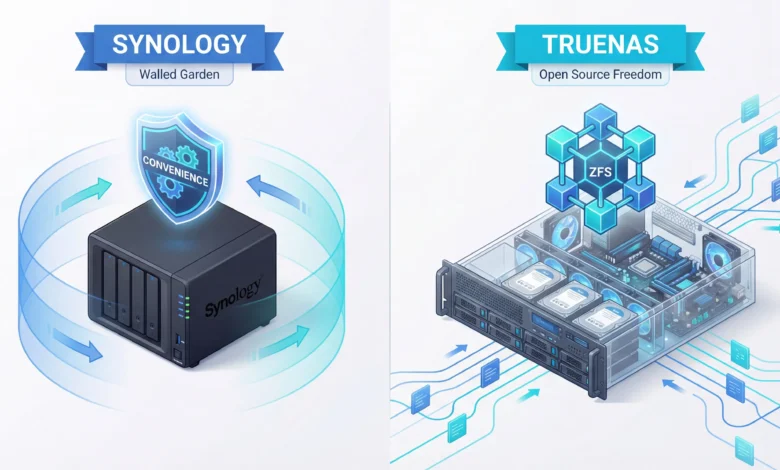
If you’re wrestling with the synology vs truenas 2026 dilemma right now, you’re not just picking a brand. You’re picking a lifestyle. Synology is the Apple of network-attached storage — polished, opinionated, and quietly expensive if you stray from the walled garden. TrueNAS is the Linux of storage — infinitely powerful, brutally honest, and very willing to let you shoot yourself in the foot.
This guide cuts through the noise. No filler. No sponsored fluff. Just the real trade-offs that matter for home users, prosumers, and small business owners in 2026.
The Core Philosophy: Control vs. Convenience
Before we dive into specs, understand this: Synology and TrueNAS are solving the same problem with completely opposite philosophies. Synology believes you should never have to think about your storage. TrueNAS believes you should understand every layer of it.
Synology’s DSM (DiskStation Manager) operating system is one of the most polished pieces of software in the NAS world. Updates arrive automatically. The app ecosystem is mature and well-integrated. Support is real, responsive, and in English. But that polish comes with a cost that goes beyond the sticker price — more on that in a minute.
TrueNAS SCALE (the Linux-based version, now the focus of development in 2026) is built on Debian Linux and leverages ZFS, the gold standard file system for enterprise data integrity. It’s free. It runs on almost any hardware you throw at it. The trade-off? You are the IT department. The documentation is excellent but extensive, and the learning curve is real.
The Synology Tax Is Real in 2026 — Here’s What You’re Actually Paying
Let’s talk money, because this is where the conversation gets spicy. The Synology DS923+ retails for around $600 — and that’s before you buy a single hard drive. But the hardware cost is just the beginning.
In 2026, Synology has doubled down on its drive compatibility strategy. Several newer models — including units in the Plus and XS series — now officially restrict you to Synology-branded hard drives (HAT5300 series) or drives that appear on their official compatibility list. Use an unlisted drive, and you may lose access to DSM’s health monitoring features, see warnings plastered across your dashboard, or find that certain features are simply disabled.
Synology drives carry a meaningful premium over comparable drives from WD or Seagate. Over a 4-bay build with 4×12TB drives, that difference can add up to $150–$300 in extra costs over comparable aftermarket options. Multiply that across upgrades and replacements over five years, and the “affordable” Synology suddenly isn’t.
TrueNAS has no such restrictions. You can use any drives you want. WD Red, Seagate IronWolf, enterprise SAS drives pulled from a data center eBay lot — TrueNAS will work with all of them and give you the same monitoring and health data regardless.
Synology DS923+ — The Reliable Mid-Range Workhorse
A 4-bay powerhouse running AMD Ryzen R1600 dual-core with 4GB DDR4 ECC RAM. This is the “set it and forget it” NAS for home users who want business-grade reliability without a business-grade headache. Expandable to 10 bays with the DX517 expansion unit. Runs Synology’s DSM 7.2 with Active Backup, Surveillance Station, and 300+ native apps.
✅ Pros
- Fastest out-of-box setup of any NAS
- ECC RAM standard for data protection
- Excellent mobile app ecosystem
- 10GbE upgrade slot (E10G22-T1-Mini)
- Mature 5-year warranty path
❌ Cons
- Drive compatibility restrictions tightening
- No GPU for transcoding at this price
- Synology-branded drives add cost
- Less flexible than TrueNAS for power users
ZFS: TrueNAS’s Secret Weapon (And Why It Actually Matters)
The single most compelling reason to choose TrueNAS over Synology — if you’re technically inclined — is ZFS. Synology uses Btrfs, which is genuinely good. But ZFS is in a different league, and here’s why it matters to you in plain English.
Hard drives lie. They will silently corrupt data — flipping a 0 to a 1 deep inside a photo or document — and then report back “all clear” when the OS checks on them. This is called bit rot, and over a multi-year period with terabytes of data, it’s not a matter of if it happens, but when. ZFS uses end-to-end checksumming: it calculates a unique fingerprint for every piece of data and verifies it every time that data is read. If something has changed, ZFS knows — and if you have a redundant array, it fixes it automatically without you ever seeing an error message.
Synology’s Btrfs also does checksumming, and it’s legitimately good. But ZFS’s implementation — especially with features like ZFS ARC caching, RAIDZ configurations, and send/receive replication — gives TrueNAS an edge for users who store truly irreplaceable data: raw photos, 4K video masters, business archives.
The critical footnote: ZFS loves ECC RAM. ECC (Error-Correcting Code) RAM catches memory errors before they can be written to your pool and corrupt your checksums. TrueNAS officially recommends ECC RAM. Synology’s Plus-series units (like the DS923+) include ECC RAM by default. If you’re building a DIY TrueNAS machine on consumer-grade hardware without ECC, you’re partially undermining the very feature you chose TrueNAS for.
DIY TrueNAS SCALE Build — The Open-Source Freedom Machine
TrueNAS SCALE is free to download and runs on almost any x86-64 hardware. A popular entry-level build in 2026 pairs an Intel N100 mini-PC or an AMD Ryzen 5700G platform with 32GB ECC RAM and a used HBA card. You get Docker, KVM virtualization, and ZFS — all for the cost of the hardware alone. No license fees, ever.
✅ Pros
- Completely free software — forever
- ZFS: best-in-class data integrity
- Run any Docker container or VM
- Use any hard drives from any vendor
- No vendor lock-in on hardware
❌ Cons
- Steep initial learning curve
- You are your own support department
- UI less polished than Synology DSM
- App ecosystem requires more DIY
Software Ecosystems: DSM 7.2 vs. TrueNAS SCALE Apps
This is the area where most people make their decision — and where Synology’s advantage is most concrete. DSM 7.2 includes a native app store with over 3,000 packages. Many of these are first-party Synology apps: Moments (photo management), Drive (Google Drive alternative), Surveillance Station (IP camera management), and Active Backup (full PC/VM backup). These apps are polished, regularly updated, and work together seamlessly out of the box.
TrueNAS SCALE’s app ecosystem works primarily through TrueCharts — a community-maintained library of apps deployed as Kubernetes containers. Want Plex? Done. Nextcloud? Easy. Home Assistant? Absolutely. The library is huge and growing. But “easy” is relative: you’ll configure environment variables, storage mount points, and network settings manually. It’s not click-to-install the same way DSM is.
The key differentiator in 2026: TrueNAS SCALE now supports Docker Compose natively via its “Custom Apps” feature. This is a massive unlock — it means you can run virtually any self-hosted software on the planet without waiting for an official TrueCharts package. Synology supports Docker through Container Manager, but its permissions model is more restrictive, and you’ll hit walls if you try to run containers that need elevated system access.
Real-World Performance: Which Is Actually Faster?
Raw throughput benchmarks are almost meaningless without context. Here’s the context you need.
For sequential read/write (moving large files, like 4K video), both platforms are neck-and-neck when properly configured. A Synology DS923+ with a 10GbE upgrade card can push close to its theoretical limit. A TrueNAS build with equivalent hardware will match or exceed it — especially if you configure an L2ARC cache (a fast SSD that acts as an overflow cache for the most-accessed data).
For random IOPS (the kind of workload you get from running multiple Docker containers, a database, or active Plex transcoding), TrueNAS’s ZFS ARC caching is a significant advantage. If you give it enough RAM (32GB+), ZFS caches hot data aggressively in memory, and performance stays high even under multi-user loads that would make Btrfs sweat.
For video transcoding, Synology has a meaningful advantage at the mid-range: the DS923+ can do hardware transcoding through Synology’s Video Station with the right package license. TrueNAS can also do hardware transcoding through Plex or Jellyfin — but only if your DIY hardware has an Intel Quick Sync or AMD GPU. It’s more configurable but requires you to know what you’re doing.
Synology vs TrueNAS 2026: Feature-by-Feature Comparison
| Feature | Synology DSM 7.2 | TrueNAS SCALE | Winner |
|---|---|---|---|
| Setup Ease | 5 min click-through wizard | 1–3 hours (first time) | Synology |
| File System | Btrfs (good) | ZFS (gold standard) | TrueNAS |
| License Cost | Hardware cost + drive lock-in | $0 forever | TrueNAS |
| Drive Freedom | Increasingly restricted | Any drive, any vendor | TrueNAS |
| Mobile Apps | Excellent (DS File, Moments) | Third-party apps required | Synology |
| Docker / Containers | Container Manager (restricted) | Full Docker Compose support | TrueNAS |
| VM Support | VMM (limited) | Full KVM hypervisor | TrueNAS |
| Data Integrity | Btrfs checksums (good) | ZFS checksums + self-heal | TrueNAS |
| Warranty / Support | 5-year hardware warranty | Community + iXsystems paid | Synology |
| Scalability | Limited by bay count | Theoretically unlimited | TrueNAS |
| UI Polish | Industry-leading | Functional, improving | Synology |
| Community Size | Massive (r/synology: 300K+) | Large (r/truenas: 100K+) | Synology |
| Ideal For | Families, SMBs, non-techies | Enthusiasts, power users, labs | — |
The Decision Framework: Which One Is Right for You?
Stop overthinking it. Here’s how to decide in two minutes.
Choose Synology if: You want a device that runs in the background and you never have to think about. You care more about having great mobile apps than having unlimited configuration options. You run a small business where downtime has a real cost and you need actual phone support. You store photos, media, and backups — not mission-critical databases.
Choose TrueNAS if: You’ve already used Linux and are comfortable in a terminal. You want to run self-hosted services — Nextcloud, Vaultwarden, Home Assistant, Immich — with real flexibility. You refuse to pay the “Synology Tax” on drives. You want to be certain your data is intact in 10 years, and ZFS’s self-healing gives you that peace of mind in a way nothing else does.
The uncomfortable middle ground: You want TrueNAS’s data integrity but Synology’s convenience? There’s actually a third option worth considering: Synology with a BTRFS scrub schedule + Hyper Backup to a TrueNAS offsite. Use Synology for day-to-day convenience and TrueNAS as your off-site replica. You get the best of both worlds — at the cost of running two systems.
⚖️ Leo’s Final Verdict
If you’re a Cautious Technophile — you love tech but value your evenings more than your uptime dashboards — stick with Synology. The DS923+ is genuinely excellent, and DSM is the most polished NAS OS on the market.
If you’re an Amateur Creator or Home Lab enthusiast who craves total control, wants to self-host everything, and gets a small thrill every time a Docker container comes online — take the TrueNAS plunge. The learning curve is real, but so is the reward. Your data will be safer, your wallet will be happier long-term, and you’ll never hit a wall when you want to run something new.
The worst choice? Picking TrueNAS because it’s “free” and then spending 20 hours trying to configure SMB shares you could have set up in Synology in 4 clicks. Be honest about your tolerance for tinkering before you commit.
Already on Synology? Here’s How to Migrate to TrueNAS Without Losing Sleep
The most common question we get at HomeCloudHQ: “I have a Synology. Should I switch to TrueNAS?” And the honest answer is: maybe, but don’t rush it.
Synology makes it very easy to get your data in and deliberately less easy to get it out. DSM uses a proprietary RAID format (SHR — Synology Hybrid RAID) that isn’t compatible with other NAS platforms. If you pull your drives out of a Synology and stick them in a TrueNAS machine, you won’t see your data.
The migration path that works: set up your new TrueNAS system with fresh drives, then use Synology’s Hyper Backup or simple SMB/NFS transfers to copy your data across the network. Once everything has been verified (use checksums, not just a file count), wipe the old Synology drives and repurpose the unit or sell it.
Budget for the migration to take a full weekend, not an evening. Patience here pays dividends — rushed migrations are where data gets lost.
Security in 2026: Ransomware, Remote Access, and Who Protects You Better
NAS security deserves its own article — and we’ve written one. But here’s the quick picture for this comparison.
Synology had a rough patch in 2021–2022 with StealthWorker brute-force attacks targeting DSM login pages. Their response — mandatory 2FA, account lockout, auto-block — was swift and effective. DSM 7.2 in 2026 includes Security Advisor, which actively scans your configuration for common vulnerabilities and tells you what to fix in plain language. For users who don’t want to think about security beyond checking a list, Synology’s guided approach is genuinely valuable.
TrueNAS is inherently more secure in one important way: it doesn’t have a cloud relay service. Synology’s QuickConnect (which lets you access your NAS remotely without port forwarding) routes traffic through Synology’s servers. TrueNAS has no equivalent — you configure your own VPN (WireGuard is the modern standard, and TrueNAS SCALE makes it easy to set up). That means your data’s remote access path never touches a third-party server. For privacy-conscious users in 2026, this matters a lot.
The ZFS snapshot feature in TrueNAS is also a powerful ransomware defense. Snapshots happen instantly, take no extra disk space for unchanged data, and can be configured to be read-only — so ransomware can’t encrypt or delete them even if it compromises your running system. Synology also offers snapshots through Btrfs, but the implementation is slightly less granular.
FAQ — Synology vs TrueNAS 2026
Can I use my existing Synology drives in a TrueNAS build?
The drives themselves — yes. The data on them — not directly. Synology formats drives using SHR (Synology Hybrid RAID), which is a proprietary format incompatible with TrueNAS’s ZFS. You cannot pull drives from a Synology and read them in TrueNAS. You must copy your data over the network to your new TrueNAS system first, then wipe and reformat the drives in ZFS pools. Allow a full weekend for this process on large arrays.
Is TrueNAS SCALE really free? What’s the catch?
TrueNAS SCALE is genuinely free and open source — no licensing fees, no feature paywalls, no time limits. The “catch” is that iXsystems (the company behind TrueNAS) makes money by selling enterprise support contracts and hardware appliances. The community version gets the same software as the enterprise version. What you’re paying with is time and technical expertise, not money. If something breaks, you’re responsible for diagnosing and fixing it, unless you’ve purchased a support contract from iXsystems.
Does TrueNAS work without ECC RAM? Is it safe?
Technically, yes — TrueNAS SCALE will install and run on non-ECC systems. The nuanced answer: ZFS uses RAM as a staging area for writes and as a checksum verification layer. If a memory error corrupts data in RAM before it’s written to disk, ZFS can’t catch it — because ZFS protects against disk errors, not RAM errors. ECC RAM catches these before they propagate. The risk on non-ECC RAM is low in practice (modern RAM is reliable), but for a system storing irreplaceable data long-term, ECC is worth the extra cost. Budget ~$150–$200 more for ECC-capable hardware.
Can I run Plex on both Synology and TrueNAS?
Yes, both platforms support Plex Media Server. On Synology, you install it from the Package Center — straightforward and well-supported. On TrueNAS SCALE, Plex runs as a Docker container or through TrueCharts, and with a bit of configuration, it has access to hardware transcoding (Intel Quick Sync, AMD AMF, NVIDIA CUDA depending on your hardware). For hardware transcoding on Synology, you need a compatible unit (the DS923+ does support it with the right codec packages). In practice, Plex works well on both — TrueNAS gives you more hardware flexibility, Synology gives you a simpler setup path.
Which NAS is better for a complete beginner with no Linux experience?
Synology — without hesitation. DSM is the most beginner-friendly NAS operating system available in 2026. You don’t need to know what a terminal is, what ZFS means, or how to configure a network interface. The setup wizard walks you through everything, the help documentation is clear, and the mobile apps make day-to-day use feel as simple as Dropbox. If you later outgrow Synology and want to explore TrueNAS, the knowledge you’ve built about NAS concepts (RAID, network shares, backup strategies) will make the transition much easier.
What happens if Synology goes out of business? Will my data be locked?
Your data itself isn’t locked — Synology uses Btrfs and ext4 on Linux, both of which are open standards you can read from any Linux machine. If DSM stops receiving updates, your NAS continues working; it just won’t get new features or security patches. The practical risk is a long-term one: if you’ve invested deeply in Synology’s ecosystem (Drive sync clients, Active Backup agents on all your PCs, Surveillance Station), you’d need to migrate those workflows over time. This is one reason maintaining good offsite backups in a format-agnostic way (like Synology Hyper Backup to a cloud target) is always smart.
📚 Further Reading — HomeCloudHQ
- The Best NAS for Home Use in 2026 (Our Top 5 Picks)
- SSD Cache NAS: Is It Worth It for Home Use? (2026 Guide)
- How to Secure Your Family NAS Against Ransomware
- Migrate Google Photos to NAS: Complete Weekend Guide
- Synology NAS Troubleshooting: Proven Fixes Fast (2026)
- TrueNAS Official Documentation
- Synology DS923+ Official Product Page
🏠 Get the HomeCloudHQ Weekly: NAS Tips, Deals & Guides
Join 14,000+ home cloud enthusiasts. Every week: one actionable tip, one deal worth your attention, zero fluff.
No spam. Unsubscribe anytime. We hate cluttered inboxes as much as you do.
Ready to Make Your Move?
Whether you go with Synology’s polished reliability or TrueNAS’s open-source freedom, the best NAS is the one you’ll actually use and maintain. Pick your path, set it up properly, and your data will thank you for the next decade.
🛒 Get the Synology DS923+ ⬇️ Download TrueNAS Free